Configure the time zone for notification emails
You can now select the time zone used to schedule notification emails. This helps ensure that notifications are sent according to your preferred time zone.
We also improved how notifications scheduled between hourly processing times are handled. For example, a notification scheduled for 8:30 AM is included in the 8:00 AM processing cycle to help ensure that it is not missed.
If you do not select a time zone, your existing notification settings and send times remain unchanged.
Improved Field Order on the Work Type Card
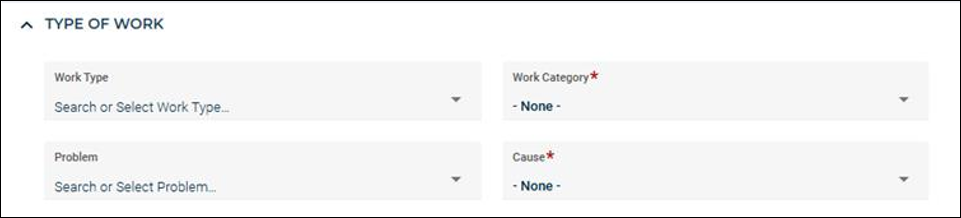
The Work Type card has been redesigned to follow a more logical workflow, making it easier to enter and classify work order information.
-
Fields now appear in a streamlined order, with Work Type and Work Category displayed first, followed by Problem and Cause.
-
Keyboard navigation has also been updated to match this sequence, helping users move through related classification fields more efficiently.
-
The layout automatically adjusts when fields are hidden through work order templates, ensuring a clean and consistent experience across configurations.
This enhancement is applied automatically and does not impact existing work order data, templates, or settings.
Improved Work Order Geolocation Accuracy
Work orders now use latitude and longitude values from the selected work source when available, improving map positioning accuracy. A new Use Work Source Geolocation button has also been added to the Work Order form, allowing you to update or reset the work order's geolocation using the current work source geolocation. Work orders created directly from the map continue to use the selected map location.
Planning and Scheduling Enhancements
This release delivers a more streamlined Planning and Scheduling experience through targeted UI refinements and improved scheduling validation.
NOTE The enablement begins October 1st and will be rolled out to customers on a rolling basis. If you do not see these updates in your account yet, they will become available in an upcoming release.
Key updates include:
-
Enhanced Planning and Scheduling usability with improvements to filters, work order cards, swim lanes, navigation controls, and the Work Order side panel.
-
Reliable synchronization of PM-generated Work Orders to the Planning and Scheduling board, including previously affected existing PMs.
Rebranding to Siemens Software
Brightly is now Siemens. Same world-class software, with a new look and feel.
The Smart Assets in Asset Essentials product suite has been rebranded to align with Siemens branding. This update introduces Siemens branding across the application, replacing the previous Brightly Software branding in customer-facing screens.
This rebranding does not affect product functionality and is intended to provide a consistent experience across the Siemens Smart Assets software offerings.
Work Order Auto-Summarization
The AI Summary feature in Asset Essentials Enterprise (AEE) generates a concise, auto-generated overview of key information for a selected work order. It helps technicians quickly understand critical details on the current work order such as the issue, actions taken, and status without reviewing every field individually. This allows technicians to start work faster and supports efficient shift handovers by clearly summarizing prior actions and outcomes.
NOTE This feature is available on both the Web and Mobile versions of AEE. If AI Summary button is not visible in your AEE environment, have the account admin navigate to Admin → Configurations → System Setting and then enable AI features. Reach out to your system administrator for further assistance.
Maintenance Copilot
Maintenance Copilot is an intelligent assistant in Asset Essentials Enterprise (AEE) that enhances maintenance efficiency by providing in-context support within work orders. It uses two key data sources:
-
Asset manuals (PDFs): Linked directly to the asset for quick reference
-
Maintenance records: Include past maintenance dates and actions performed
Based on this information, Copilot provides step-by-step instructions, diagnostic guidance, and fix recommendations, enabling technicians to complete work orders faster and more effectively.
The effectiveness of Maintenance Copilot depends on data quality. Missing manuals or incomplete, inaccurate maintenance history can reduce the relevance and usefulness of its outputs. To maximize its value, ensure your data is complete, accurate, and up to date.
NOTE This feature is available on both the Web and Mobile versions of AEE. If Copilot button is not visible in your AEE environment, have the account admin navigate to Admin → Configurations → System Setting and then enable AI features. Reach out to your system administrator for further assistance.
Archived Release Notes
Click here to view previous releases that have been deployed to Asset Essentials.
Year in Review
Click here to view the recent features and enhancements that have been released so far this year in Asset Essentials.
Do you still have questions after reading the release notes? You can contact our Client Services team for assistance.
